#1 · David J Bush
11 Sep 2021
Things aren't working, see below
 Little GolemMake your next move.
Public forum discussion.
11 Sep 2021
Things aren't working, see below
11 Sep 2021
This is what I saw as I was typing the above:
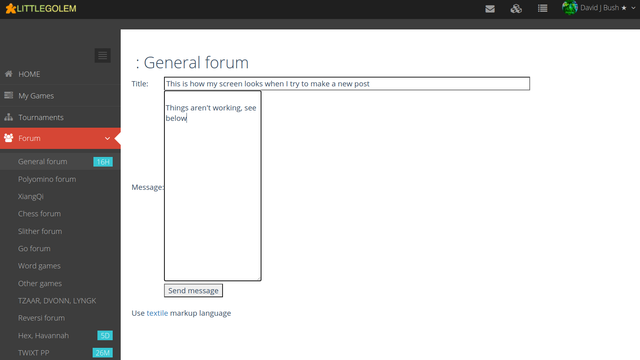
Note that there are no formatting icons, but there IS a link at the bottom about textile markup. Also note the right margin is a lot closer to the left than it should be.
This second post does show formatting icons, although the text I am typing is monospace. For my first post, the text I was typing was NOT monospace but it showed up as monospace. Here in this second post, the text I type is monospace and does not show up as such.
The same thing happens under both Firefox and Brave.
Does anyone else have this problem?
11 Sep 2021
I had the same issue (see the start of my post "rules for numeric wyps")
11 Sep 2021
Sure. Happens much of the time, now, but maybe not ALL the time. You can still post. Sometimes, your post comes out with some weird boxed formatting around it; sometimes not.
Certainly you guys are not alone here, and it certainly is NOT your browser choice. It is Richard - plain and simple. I'm guessing he fooled around with the word processor, but without success. Thing is, he doesn't always READ posts here, in the forum. Somebody should bring this to his attention, directly. As OP, you'd be 'up', David.
mc
11 Sep 2021
OK I sent him a link to this page.